 Guardpup
Browser Extension
For AI chats in the browser: ChatGPT, Claude and Gemini (Copilot, Perplexity, Grok and DeepSeek: being tested); the full list. Tested in Chrome; Edge, Brave and Arc should work and are being tested.
Install It
- Get it from the download page (Add to Chrome).
- Click the puzzle piece 🧩 at the top right of the browser, then the pin next to Guardpup. Rocky, our guard pup, stays in the toolbar from then on.
- Reload any AI chat tab that was already open, so Guardpup is in it.
That's all: no account, nothing to set up. The browser updates the extension by itself.
When You Send a Secret
When your message has a key, a password, a card or ID number or a personal detail in it, Guardpup holds it back before anything is sent and asks:
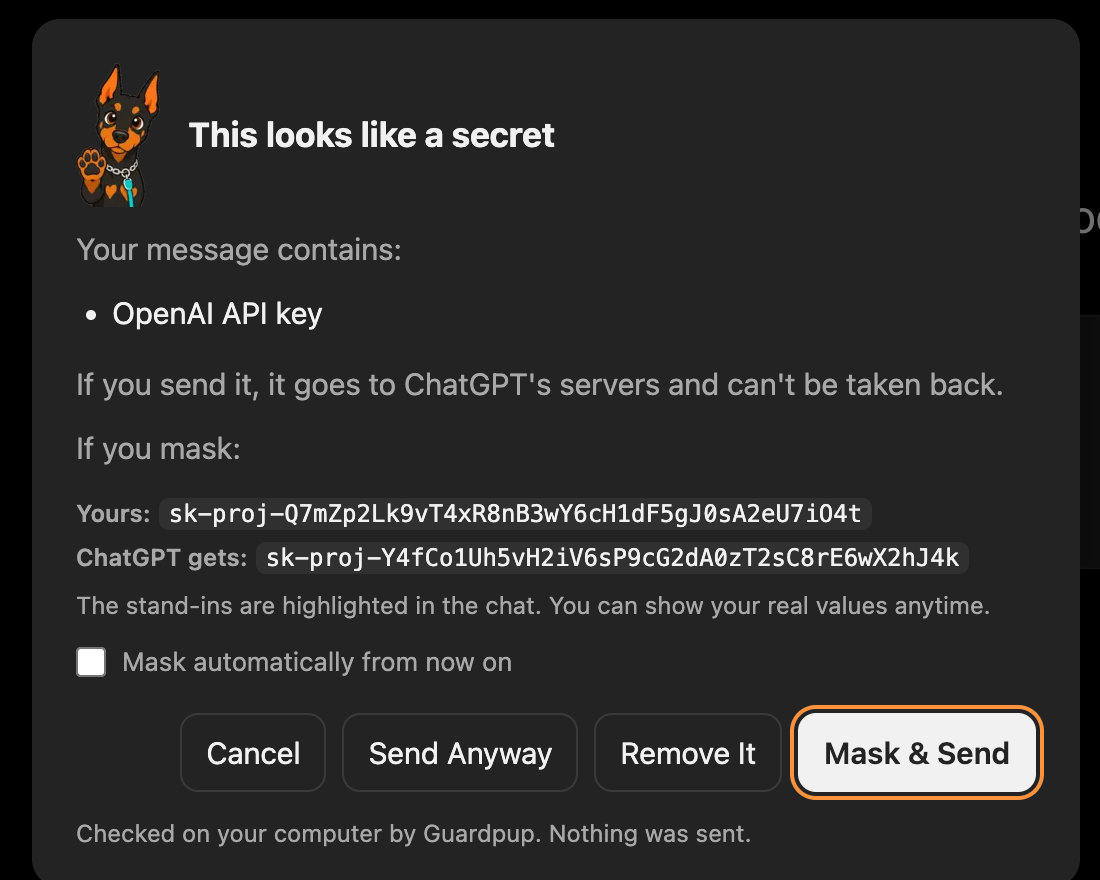
| Button | What it does |
|---|---|
| Mask & Send | Swaps each secret for its stand-in and sends. The AI can still help, but never sees the real value. |
| Remove It | Takes the secret out of the message, so you can send the rest. |
| Send Anyway | Sends your message as it is, this once. |
| Cancel | Sends nothing and leaves your message as you wrote it. |
Ticking Mask automatically from now on masks without asking next time (Mask automatically, part of Pro). Pasting works the same way: a secret you paste is caught as it lands in the message box.
Stand-Ins in the Chat
Stand-ins stay highlighted in the chat, so you can see exactly what the AI received:

A pill at the bottom right of the chat counts what was masked. Show My Real Values swaps the stand-ins back to your values, on your screen only; Show What ChatGPT Got swaps them back again.



When you copy from the chat (code the AI wrote, say), your real keys and passwords come back in place of the stand-ins, so the code works. A paste back into an AI chat is checked again. The link between stand-ins and your values is kept in that tab's memory and is gone when you close it.
Rocky's Menu
Click Rocky in the toolbar:
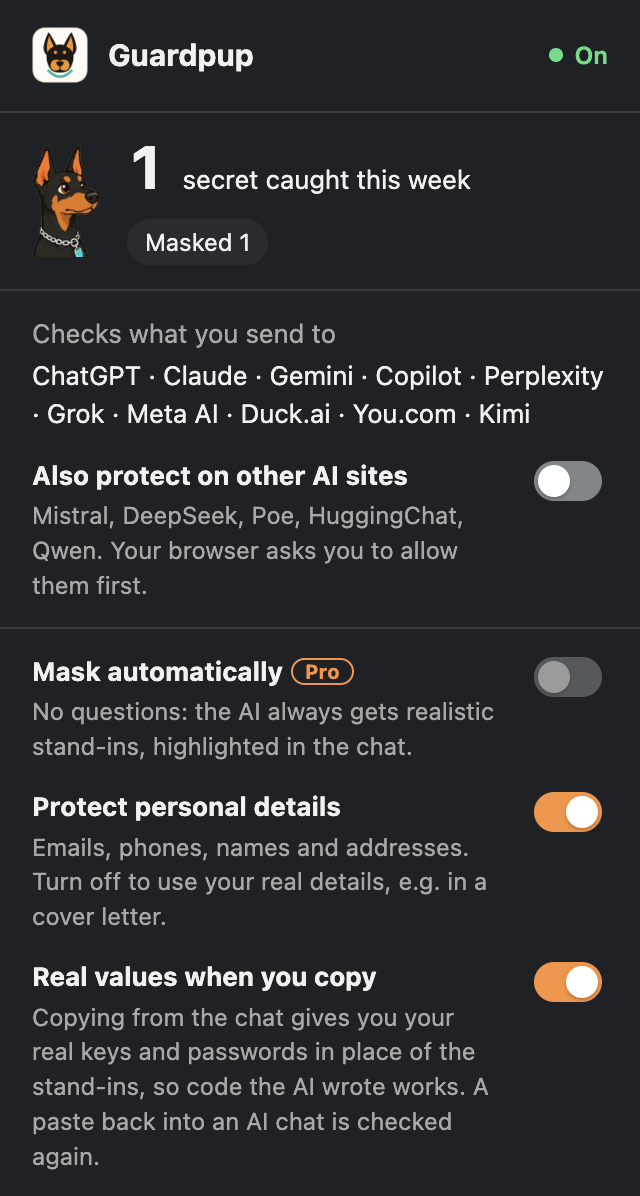
| In the menu | What it does |
|---|---|
| This week | How many secrets were caught, and what you chose for them. |
| Also protect on other AI sites | Adds more AI sites. Your browser asks you to allow them first. |
| Mask automatically Pro | No questions: the AI always gets stand-ins, highlighted in the chat. |
| Protect personal details | Emails, phone numbers, names and addresses. Turn it off when you want the AI to use your real details, in a cover letter for example. |
| Real values when you copy | Copying from the chat gives you your real values in place of the stand-ins. |
| Manage What to Protect… | Your own protected items Pro, and things you told Guardpup never to mask. |
| Check My AI History | Finds keys and passwords you already sent ChatGPT or Claude. |
| Share anonymous usage counts | Off unless you turn it on. See what's sent shows exactly what would go. |
| Recent | What was caught lately, kept only on this computer. The secrets themselves are never stored. |
| Pause for 1 Hour, Turn Off | Pausing turns itself back on. While Guardpup is off, Rocky shows a grey OFF badge. |
If Rocky shows a red !, Guardpup is on the site but can't find its message box, usually because the site just changed its design. Open the menu to see what's wrong, and tell us.
Pro in the Extension
With Pro, the extension also checks screenshots and files you attach, masks automatically if you like, and protects things you add yourself. Your first week after installing includes Pro, with no account; Rocky's menu shows the days left. To keep Pro after it, sign in at guardpup.io/account in the same browser and choose a plan. Account and Plans explains it step by step.
Remove It
Right-click Rocky and choose Remove from Chrome. Chrome deletes everything the extension stored. Uninstall covers every app.